
The quality control and optimization phase is a crucial step in any website design project. This stage requires seamless coordination between the various stakeholders involved: quality control managers, developers, strategists, designers, project managers, and of course, clients.
Integrating clients into this phase can sometimes prove complex, especially if the appropriate tools to collect their feedback and guide them effectively through the quality control process are not available. To avoid ending up with 17-page PDF documents filled with screenshots, it is best to provide a clear framework for all stakeholders from the start. This ensures that all feedback is structured in the same way and accelerates the quality control process.
The key to a successful quality control phase is moving as quickly as possible through the following feedback and correction loop: 1) testing, 2) bug reporting, 3) bug fixing, 4) deployment.
Steps 2 and 3 often require the most management, as client feedback must be coordinated, processed, and transformed into concrete tasks for the development team.
What if there were a revolutionary tool that allowed us to facilitate this management and structure requests?
Marker.io: The feedback loop accelerator
That’s where Marker.io comes in. A revolutionary tool we use at TREIZE that accelerates the feedback loop by simplifying every step of the process.
Marker.io is a visual bug reporting and feedback platform for web development teams. It allows users to easily report visual issues on websites, such as UI bugs, layout problems, or design errors.

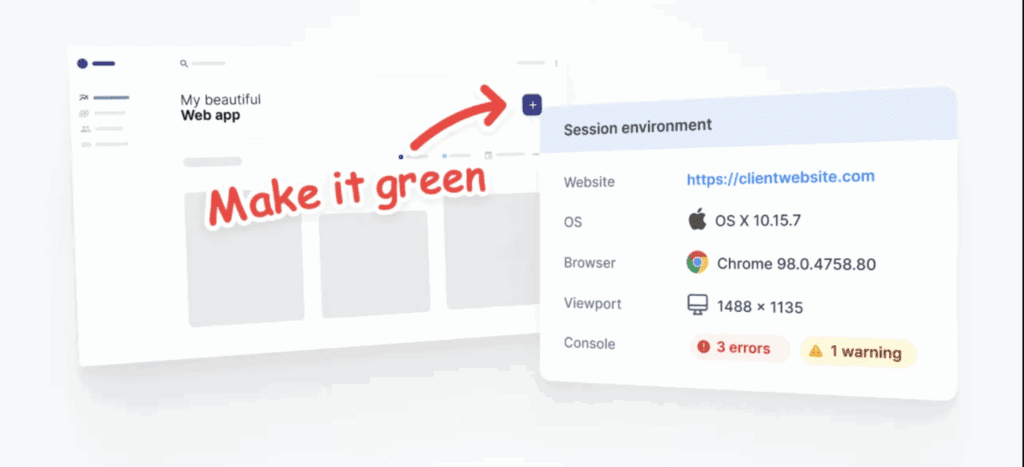
Users can easily report issues using screenshots and annotations directly on the website. In addition to providing a text explanation of the problem encountered, they can add annotations, arrows, or shapes to the screenshots to provide more context. The more visual a bug report is, the more actionable it becomes.
Furthermore, all reports include the page URL, environment information (OS, browser), console logs, network requests, and even a video of the last 30 seconds of navigation. Capturing this information with every report reduces back-and-forth with users.
Synchronizing reporting and project management tools
Next, user feedback is automatically transmitted to a project management tool (Jira, GitHub, Trello, Asana, ClickUp, and Notion). This avoids having to manually transform feedback into tasks and facilitates the centralization of information where the development team spends most of its time: the project management tool. The better we can facilitate information transfer to this location, the more efficient we will be in managing quality control.
Finally, when an adjustment is deployed and the task is closed in our management tool, a notification is sent to the user to inform them that the request has been completed. It is even possible to leave a comment to explain the work performed or to provide more context. We could all spend a little less time in our inboxes, so this feature is very welcome!
Facilitating the management and triaging of user feedback
One of the underrated features of Marker.io is the ability to pre-fill form fields. When a user completes the form, the pre-filled information is sent directly to the project management tool. As you can imagine, this makes triaging much easier.
Additionally, since there are two distinct forms for team members and guest users (clients), it is possible to have different pre-filled information for each. An excellent way to gain speed and efficiency!
In the fast-paced context of website design, responsiveness to user feedback is essential to ensure project success and adherence to deadlines. By using high-performance tools like Marker.io, we can not only collect valuable feedback more easily but also process it efficiently, thereby accelerating the quality control and optimization process.